 Grand Theft Auto VI Guide
Browser game
Grand City Auto VI
Drive through Sunset Strand, take on Night Market Blockade and explore the streets in the original Market Shift sandbox.
Play Grand City Auto VIMarket Shift · Original city sandbox
Play Grand City Auto VI free online and drive through Sunset Strand in Market Shift. Looking for a console mission, save or setting? Open the GTA VI guide library.
Drive through Sunset Strand, take on Night Market Blockade and explore the streets in the original Market Shift sandbox.
Play Grand City Auto VIFind a mission step, a manual save or an accessibility setting for Rockstar’s GTA VI. Search by task or browse a category.
Browse GTA VI GuidesMarket Shift · Game preview
Grand City Auto VI starts near the beach and sends you into a neighborhood where streets, parked cars and late shifts connect. The current game build gives you a single starting objective, space to explore and a choice of how to deal with the first road blockage.
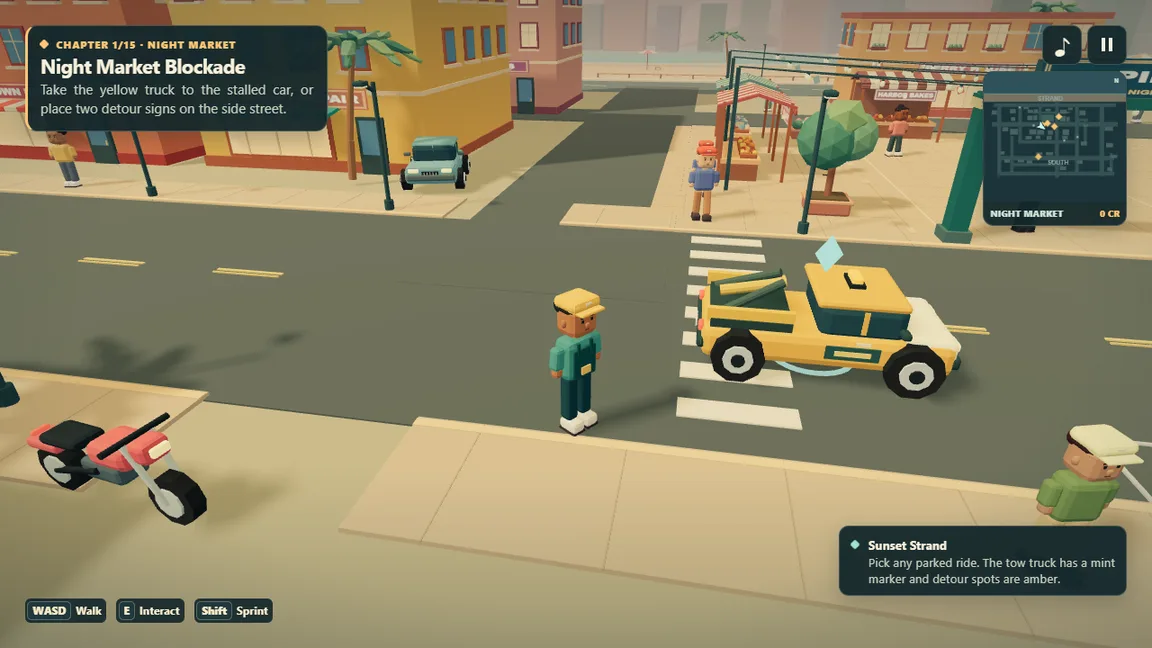
Use the screenshot to read the layout before playing. In Grand City Auto VI, the minimap shows the nearby streets and the objective panel tells you what you are working toward. On the street, the colored markers help you connect those instructions with a truck, a turn or a destination.
Play Market ShiftGrand City Auto VI changes its control hints when you enter a vehicle. Check the prompts in the corner when an action is available. If you want to practice, take a slow turn on an open street before you head toward the first objective.
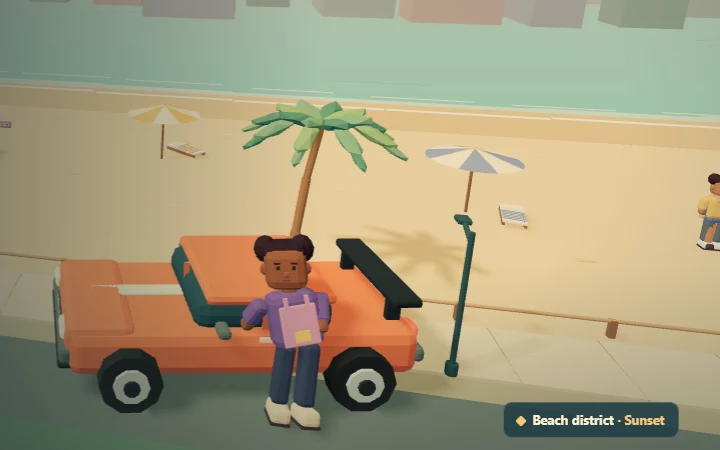
Grand City Auto VI starts near the waterfront. Use the streets, beach and marked landmarks to get your bearings. Looking at the minimap before leaving the first block makes it easier to return when you see a job marker or spot a ride that you want to try.
In Grand City Auto VI, getting into a parked vehicle changes your movement and control prompts. A truck makes sense for a job that involves moving another vehicle. For a quick tour, choose an available ride and take the wider streets first so you can get used to braking and turning.
Look at the objective panel to see what Grand City Auto VI asks of you right now. The first chapter has more than one route. Later activities draw on the same habits: read the current objective, look for the marked destination and check the result before you move on.
The opening Grand City Auto VI job gives you two ways to help the night market. The truck route puts you behind the wheel. The detour route sends you to two stops on a side street. Each has its own markers and prompts, so you can choose what to try from the start.
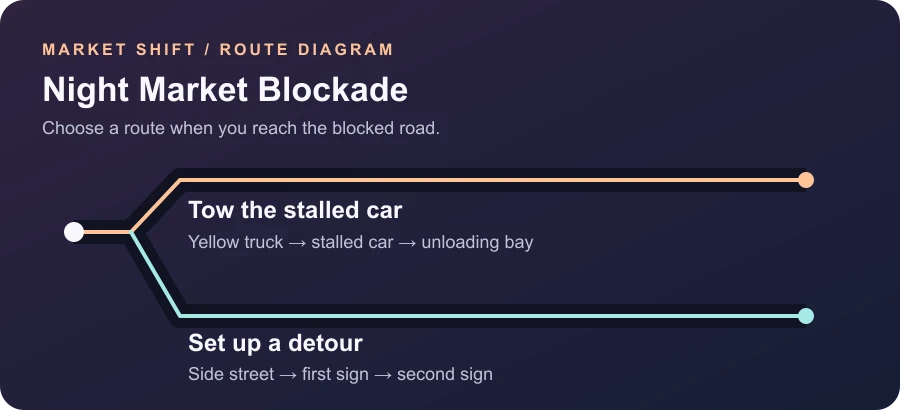
Grand City Auto VI places a yellow service truck near the starting area. Follow the truck marker, get in and bring it to the stalled car. Read the action prompt as you approach. After attaching the car, take it to the marked unloading bay and look for the objective to update. Use wide turns with the extra vehicle behind you.
The detour route in Grand City Auto VI gives you two sign locations to reach. Walk or drive to the highlighted spots and place a sign at each one. Check the current objective after the first sign so you know which marker is left. This path is a useful first choice if you are still getting comfortable with driving.
Console guide library
Use the GTA VI guide library when you need to find a menu, save your progress or get past a mission objective. Search for words you see on your console. The guide results take you to illustrated instructions with short, low-spoiler summaries.
From any guide, choose Game in the top menu to open Grand City Auto VI. The shared menu keeps both experiences within reach when you switch from reading to playing.
Browse GTA VI GuidesGrand City Auto VI opens around Sunset Strand, a beach district with roads, parked vehicles and a night market. Follow the waterfront to orient yourself, then use the minimap to see how the side streets connect. The in-game markers indicate the current chapter objective. The screenshot above shows the map and objective panel as they appear during a job.
Start with Night Market Blockade. The opening objective shows a yellow service truck and tells you about the two detour signs. Pick the route you feel ready to try, then look at the feedback after each action. Grand City Auto VI gives you enough information to start with either route, and the illustrated overview above helps you compare the first moves.
Read the control hints after you change from walking to driving. On keyboard, WASD handles movement and steering. E is used for interaction and Space applies the brake while driving. The in-game prompts can change with context, such as when an action becomes available near a vehicle. Use the hints shown by your Grand City Auto VI build as the reference.
You can look around the starting district before committing to a route. In Grand City Auto VI, trying a parked vehicle and returning to the starting road is a useful way to practice. Spend a moment learning the difference between turning, braking and getting out. When you are ready, return to the objective marker and choose how to clear the blockage.
Market Shift follows the district beyond the night market. Its current local build includes a fifteen chapter story, coast races and taxi fares. These activities build on moving between objectives, choosing a suitable vehicle and taking the route that makes sense for the job. The opening chapter is a good moment to learn how the minimap, vehicle prompts and objective panel work together.
Read the active objective in Grand City Auto VI before heading toward another vehicle or sign. Use the map for direction, then look at the street in front of you to choose an approach that the current vehicle can take. The pause menu can help if you need to check keys or recover from a difficult position. Review any recovery prompt before confirming.
The beach scene shows Nia beside a coral sports car in Sunset Strand. The gameplay image shows the first chapter after starting, including the marked truck and the active job panel. The route diagram above explains the two options in Grand City Auto VI. Its labels describe the sequence of actions so you can read it without needing a map image.
Open GTA VI Guides from the top of the Grand City Auto VI site. The library has settings, manual saving and the Gone Fishing mission. Search for a menu or phrase from your objective, then open the relevant guide and follow the section for your platform. Use the Game link to return to the preview of our original browser project.
Choose Game to open the free Grand City Auto VI browser player. It starts in Sunset Strand and includes controls, the opening mission routes and screenshots from the game. If the embedded view is too small, open the standalone player from the game page. The GTA VI guides are available separately for console settings, save points and story mission steps.